Documentation Index
Fetch the complete documentation index at: https://docs-staging.skybridge.tech/llms.txt
Use this file to discover all available pages before exploring further.
The OpenAI Apps SDK is the ChatGPT runtime layer for ChatGPT Apps, announced in October 2025. ChatGPT supports the MCP Apps UI model, and also provides window.openai for compatibility and ChatGPT-specific extensions.
View Rendering Flow
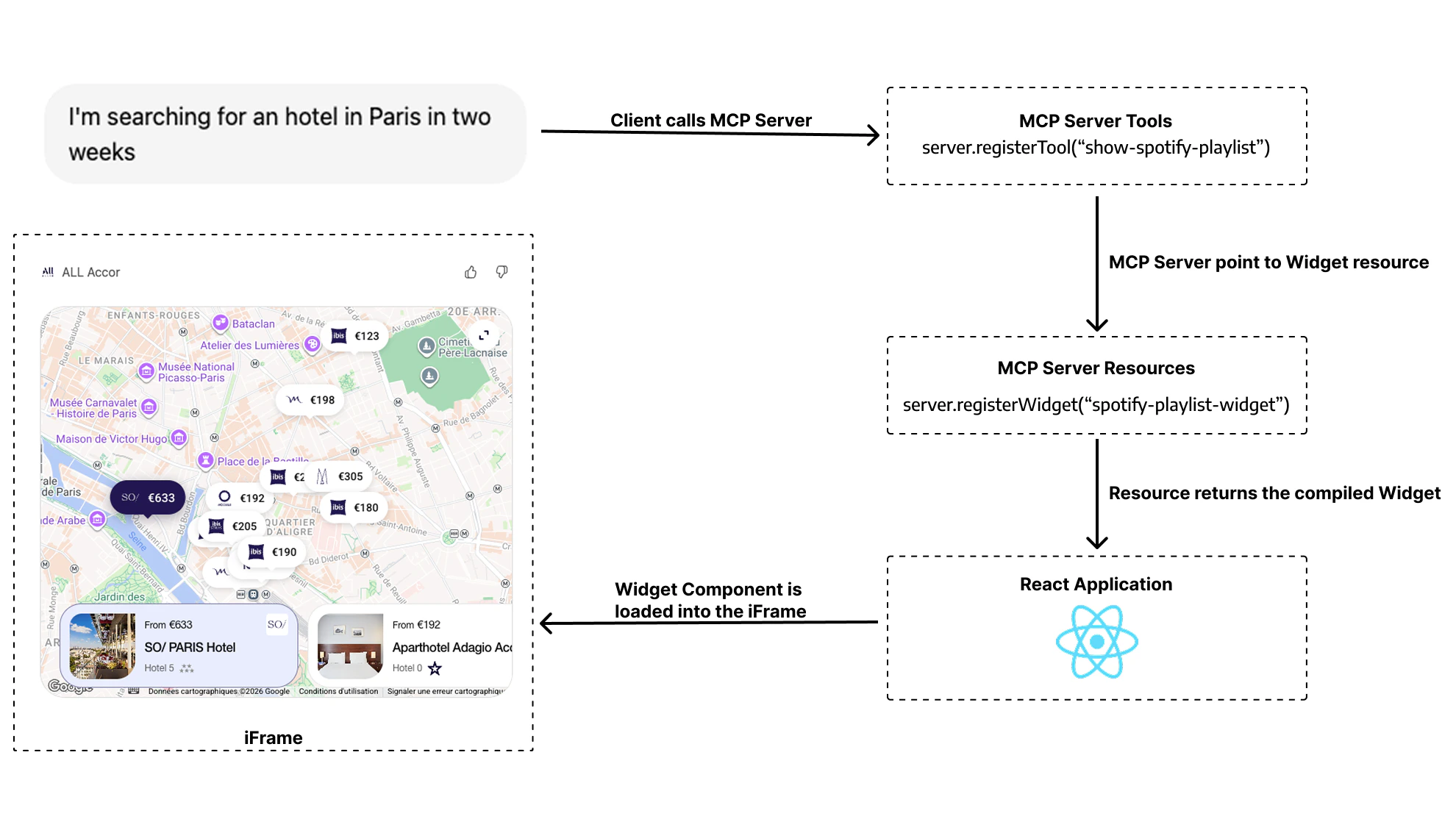
Here’s what happens when ChatGPT renders a view:
- User asks ChatGPT to perform an action (e.g., “Show me flight options to Paris”)
- ChatGPT calls your MCP tool (e.g.,
search_flights)
- Your tool returns a result with data and a reference to a UI resource
- ChatGPT fetches the resource (your compiled React component) and renders it in an iframe
- The view is hydrated with your tool’s
structuredContent and _meta properties
The window.openai API
Views run inside an iframe and have access to a special window.openai global. In ChatGPT, this acts as a compatibility layer plus an extension surface for host-specific features:
| API | Description |
|---|
toolInput | Arguments supplied when the tool was invoked |
toolOutput | Your structuredContent — initial data passed from your tool |
toolResponseMetadata | The _meta payload; only the view sees it, never the model |
viewState / setViewState() | Persist UI state across interactions |
callTool() | Trigger additional tool calls from the UI |
sendFollowUpMessage() | Send messages back into the chat |
requestDisplayMode() | Request inline, PiP, or fullscreen display |
requestModal() | Open a modal window outside the iframe |
uploadFile() | Upload files to host-managed storage |
getFileDownloadUrl() | Get download URLs for uploaded files |
openExternal() | Open external URLs safely |
setOpenInAppUrl() | Set URL for the “Open in <App>” button in fullscreen mode |
Skybridge Hook Mapping
Skybridge wraps the raw window.openai API with React hooks:
| Raw API | Skybridge Hook | Purpose |
|---|
window.openai.toolInput, toolOutput, toolResponseMetadata | useToolInfo() | Access tool input, output, and _meta |
window.openai.widgetState and window.openai.setWidgetState | useViewState() | Persistent view state |
window.openai.callTool() | useCallTool() | Make additional tool calls |
window.openai.sendFollowUpMessage() | useSendFollowUpMessage() | Send follow-up messages |
window.openai.openExternal() | useOpenExternal() | Open external URLs |
window.openai.view and window.openai.requestModal() | useRequestModal() | Request modal display |
window.openai.theme, maxHeight, safeArea | useLayout() | Theme, max height, safe area insets |
window.openai.locale, userAgent | useUser() | Locale and device/capabilities |
window.openai.displayMode and window.openai.requestDisplayMode | useDisplayMode() | Access/change display mode |
window.openai.uploadFile(), getFileDownloadUrl() | useFiles() | Upload and download files |
window.openai.setOpenInAppUrl() | useSetOpenInAppUrl() | ”Open in App” button URL in fullscreen |
Apps SDK APIs not yet supported in Skybridge
The following Apps SDK view APIs are not yet wrapped by Skybridge hooks:
| Raw API | Purpose |
|---|
window.openai.notifyIntrinsicHeight(...) | Report dynamic view heights to the host to avoid scroll clipping |
window.openai.requestClose() | Close the view from the UI (e.g. user dismisses) |
window.openai.requestCheckout(...) | Open ChatGPT Instant Checkout UI (monetization) |
window.openai when running in ChatGPT, if needed. Support may be added in a future release.
Skybridge Apps SDK Exclusive Features
These features are only available in ChatGPT and not supported in MCP Apps:
File Operations
Upload and download files with host-managed storage:
import { useFiles } from "skybridge/web";

function View() {
  const { upload, getDownloadUrl } = useFiles();

  const handleUpload = async (file: File) => {
    const { fileId } = await upload(file);
    const { downloadUrl } = await getDownloadUrl({ fileId });
    // Use downloadUrl...
  };

  return <input type="file" onChange={handleUpload} />;
}
Open in App URL
Set a URL for the “Open in App” button that appears in fullscreen mode:
import { useSetOpenInAppUrl } from "skybridge/web";

function View() {
  const { setOpenInAppUrl } = useSetOpenInAppUrl();

  useEffect(() => {
    setOpenInAppUrl("https://myapp.com/view/123");
  }, []);

  return <div>View content</div>;
}
Testing in ChatGPT
Please see the Test Your App guide for more information.
ChatGPT has aggressive caching. Use DevTools for fast iteration, then test in ChatGPT for final validation. See Fast Iteration. 
.svg?fit=max&auto=format&n=LzQ8KQMy251LcDBV&q=85&s=eb11cec78798c46ce07564be60eadc82)